

Microsoft 365 Copilot Premium FAQs
General
I have Copilot but it is not showing up in my Microsoft Applications.
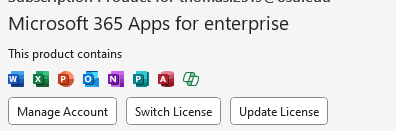
In rare instances you may need to manually update your license to see all of your Copilot features.
Start by opening any Microsoft 365 application such as MS Word or Excel.
From the File menu at the top of the application click on "Account". There you will see a button that says "Update License". You may be prompted for your lastname.#@osu.edu username and/or your password. Once you log in, wait a moment and restart the application you were trying to use Copilot with and you should see all of the Copilot features.
What is AI Hallucination?
AI "hallucination" is a term used when a Generative AI tool, like Copilot, generates information that is plausible sounding but factually incorrect or completely made up. It's not the same as a human hallucination. The AI isn't "seeing" or "imagining" things in a conscious way. AI's directive is to provide an answer, any answer, to make the user happy. That is why you must take a Use but Verify approach with any AI generated content or answers. It is up to the user to verify the accuracy of the results. Copilot's goal is to be helpful and provide a complete-sounding answer, but in doing so, it can sometimes confidently present a fabrication as a fact.
Microsoft has provided information to assist in the ethical and transparent use of AI.
Transparency Note for Copilot - This contains the Limitations for Copilot Chat
Transparency Note for Microsoft 365 Copilot (Copilot Full License)
Specific Limitations of Microsoft 365 Copilot (Copilot Full License)