

Outlook FAQs
General
What are Reactions in Outlook?
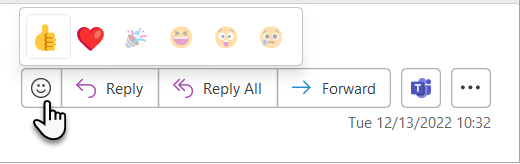
In Outlook, you can now react to an email message sent from someone in the same tenant without having to send a reply email. Show your appreciation and empathy with one click or tap!
This does not replace the need to reply to messages, especially if you need to confirm or provide information.
Users will see a reactions icon, it looks like a face in a message for any messages sent from someone internally. They can hover over or tap it to see the possible reactions to select from.
Reactions will also send a digest email to a user who received any reactions.
You may opt out of this by following the instructions in the digest email.
Why is Mac Mail/iOS Mail not a supported email client?
Initial security and operational assessments of the clients found that the consumer-focused features of Mac Mail, specifically the lack of strong authentication support (MFA) and the inability to control which third-party add-ins access University data, has prevent the use of the email client with the OSU email service.
While concerns about the use of insecure authentication methods have been addressed, concerns remain related to feature support of current and planned feature enhancements to the Universities email service and maintaining separation of personal and university data.
We continue to periodically review our implemented security controls and as email product offerings mature, we are watching to determine if any adjustments are needed.
|
Concerns/Reason |
Notes |
|---|---|
|
Both clients do not support Modern authentication protocols that allow the use of university approved MFA |
Mail for iOS 11+/iPadOS 13.1+ now supports Modern Authentication for ActiveSync but does not implement the required ISCR security controls (without additional tool [MDM] that would control the entire device) – We would have to apply policy to the entire personal device (including ability wipe all personal data).
macOS 10.14+ now supports Modern Authentication for EWS/ActiveSync but does not implement the required ISCR controls (without an additional tool [MDM]) |
|
The clients use ActiveSync or EWS for connections to interact with email, both allow a wide variety of clients to be used, but do not implement the necessary ISCR controls and are considered legacy protocols |
We have disabled the use of the ActiveSync protocol as not all clients (iOS/Android) support Modern Auth for ActiveSync and do not implement the required ISCR security controls – We would have to apply policy to the entire personal device (including ability wipe all personal data).
|
|
Mac Mail does not support the ability to restrict or control third-party add-ins |
This is a security requirement to implement the required ISCR controls due to email/Office 365 environment being rated for storage of S4 (restricted) data. |
|
Mac Mail does not support the security plugins, Report Phish and encryption tools we currently employ |
|
|
Mac Mail does not support the third-party plugins and additional features currently available with Office 365, Skype for Business, or Zoom services |
|
|
Mac Mail does not support future Office 365 roadmap features we are evaluating: Office Message Encryption/Virtru, calendar delegation, access to group/Teams calendars, no Zoom, Teams or Skype for Business meeting add-in, no access to online archive, no access to email retention tags, and enhancements to allow use/storage of ePHI/HIPAA data. |
|
|
The use of iOS Mail or Mac Mail allows commingling of Personal and university data. |
This is a data access concern if someone leaves the university they may copies of sensitive data, resulting in unintentional data theft/data leakage. |
|
Mac Mail rule set is not consistent with backend mail server (Exchange) rules, which can lead to inconsistent rule functionality and support calls |
Previously this has led to several lengthy support cases due to locked mailboxes and mass duplication of email messages. |
|
Mac Mail has had issues handling mailboxes of large sizes that has led to instability in the client in addition to data corruption and lost messages. |
Previously this has led to several lengthy support cases due to locked mailboxes and mass duplication of email messages. |
|
No technical support for the Mac Mail client by Microsoft (email service provider) under our current support contracts |
|
|
Mac Mail Calendar requires default calendar permission to be set to Reviewer on people to see their available calendar data (system default is view only, requires special changes to every account) |
|
Common iOS/iPadOS Mobile device questions
“I am unable to use XYZ application on my phone/tablet.”
Mobile devices used with your OSU account have restrictions applied to them that only allow the use of approved applications. This is to prevent university data from being used in unsecure applications or the data stored in approved services that may not be appropriate for the data classification. This includes limiting copy/paste functions, blocking the use of device OS native file browsers (like Files in iOS/iPadOS) and other applications.
Further details of restrictions placed on mobile devices is available at KB06202
Common Mac Outlook questions/concerns
“How do I add inline attachments?”
Images can be added as inline attachments, from the Outlook formatting bar (the line of icons below subject and above the body) or Click and drag the image file in the message. Files that are not images cannot be added inline, they must be added as attachments.
“Too easy to mistakenly reply all, or reply to a reply, instead of the original message”
This may be mitigated by enabling ‘Show as Conversations’ in the View menu. There are also additional conversation preferences that can be changed in the Outlook menu -> Preferences -> Reading -> Conversations: Show e-mail grouped by conversation.
“I use shortcuts a lot, there doesn’t seem to be any consistency between applications”
This is an issue with different application developers unfortunately. There is a potential workaround, by using App Shortcuts in Keyboard preferences you can re-map shortcuts to be your preferred action.
Calendar
Event Creation from an Email is not functioning?
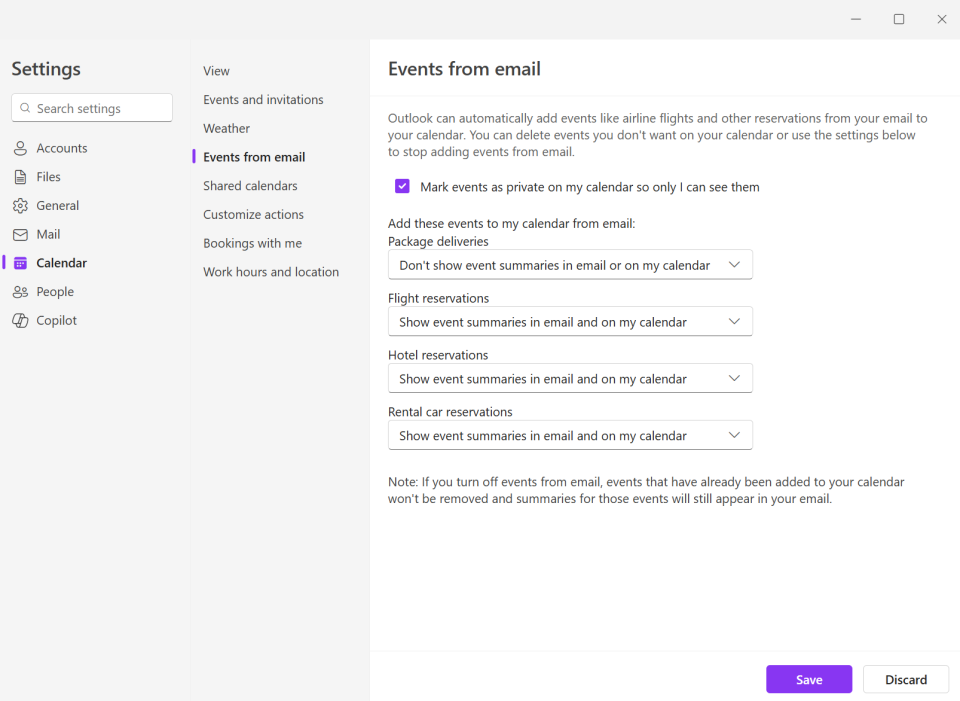
Outlook’s Events from email feature helps users stay organized by automatically adding reservations such as flights, hotels, rental cars, and deliveries to their calendars. To improve reliability and ensure this feature continues to work smoothly, Microsoft has strongly encouraged all providers to adopt Schema.org markup in their transactional emails. This change aligns with industry standards and improves accuracy, consistency, and long-term support.
Until now, Outlook has relied on legacy extraction to support this feature. However:
- Legacy extraction is fragile, and once templates fail, they cannot be fixed.
- We are receiving increasing reports of incorrect or missing events.
- It is technically impossible to make further improvements to the old stack.
- By January 2026, the old extraction stack will no longer be supported.
How does this effect you?
You may receive emails from people or organizations from outside of the university that are still on systems using legacy extraction. Events will not be able to be added to the calendar from a sent email if they are on the legacy system. Unfortunately, there is nothing that the university can do to fix this because it is the senders legacy system. You can reach out to the sender and let them know about the update to Schema.org that Microsoft has moved to.
If you are a delegate for someone, are you able to see their calendar from your Teams window?
No, currently the Teams Calender is for your events only. Management for calendar delegates should continue to be performed in Outlook.